


Starlink PoE injector: which dishes does the 200W model fit?
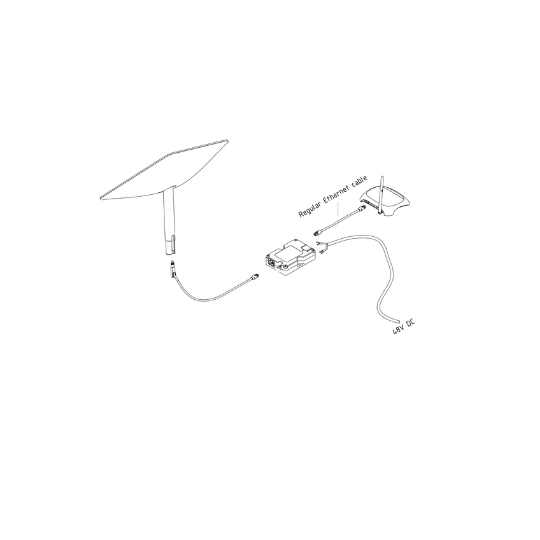
This Yaosheng 200W PoE injector (YSNEPPU20010A), sometimes called a PoE power brick, sends power and data to your Starlink dish over one cable so you can use your own router. If a dish is not mentioned in the table, we do not list it as compatible.
| Starlink dish | 200W PoE injector (YSNEPPU20010A) |
|---|---|
| Starlink V2 (rectangular motorised dish) | Compatible |
| Starlink V4 / V4X (Standard; the dish earlier known as Gen 3) | Compatible |
| Starlink Performance (1st generation, formerly High Performance) | Not covered by this injector: use our 2-in-1 12V / 24V kit for the Starlink Performance dish, which includes its own PoE injector |
| Starlink Performance (3rd generation) | Not covered by this injector: use our 2-in-1 12V / 24V kit for the Starlink Performance dish, which includes its own PoE injector |
| Starlink Mini | No injector needed: Starlink states that power over Ethernet is not supported on the Mini. To use your own router, connect its Ethernet cable directly to the Mini's Ethernet port and turn on bypass mode in the Starlink app (source: Starlink Help Center) |
Not sure which dish you have? Browse our Starlink V2 dish and Starlink Standard V4 dish pages, or read our article Mini or Standard (V4): which dish to choose?
How do you power a Starlink PoE injector from 12V or 24V batteries?
The Yaosheng injector takes a 48 to 57 VDC input. Never connect it straight to a 12V or 24V battery: it connects to your 12V or 24V batteries through the StarWifi 12V booster or 24V booster, which both work with Starlink V2 and V4 dishes, not through just any 12V supply.
Starlink V2 dish
- Connect the Starlink cable to the injector with the Starlink V2 to RJ45 cable adapter, or with a modified Starlink cable fitted with an RJ45 plug.
- Power the injector with a 12V booster or a 24V booster (both also work with Starlink V4).
- Plug your own router, or upgrade to our Wi-Fi 7 router for Starlink (under 12W, supplied with a 12V / 24V connector, faster with many devices connected), into the injector's data port (see the instructions).
Prefer a ready-to-connect set? The 12V Plug & Play kit for Starlink V2 or the 24V Plug & Play kit for Starlink V2 already includes the RJ45 adapter, the booster and a PoE injector.
Starlink V4 / V4X dish (earlier known as Gen 3)
You connect your Starlink cable directly to the injector and then use your own router. To run it from your 12V or 24V batteries, the injector needs a StarWifi 12V booster or 24V booster ahead of it. The simplest way is the Plug & Play V4 kit, which combines a 12V/24V booster and an injector. See also the 12V / 24V kits for the Standard dish.
Our 12V power supply for Starlink V4 is the other option: it plugs into the Starlink router, so you keep the Starlink router and do not need the injector.
To size your battery bank, read our article on Starlink power consumption at 12V.
What you do not need
- An injector for the Starlink Mini: you can connect your wifi router's ethernet cable directly to the Starlink Mini antenna's port (see the Starlink Help Center).
- An injector on top of a Plug & Play kit: the V2 and V4 Plug & Play kits already include a PoE injector.
- An injector if you keep the Starlink router on a V4: our 12V supply for V4 plugs into the Starlink router. The injector is for using your own router.
Yaosheng 200W PoE injector: specifications
- Model: Yaosheng YSNEPPU20010A
- Input: 48 to 57 VDC
- Maximum current: 4A
- Protections: transient surge, under-voltage, over-voltage, over-current and reverse polarity
Starlink PoE injector FAQ
What does a Starlink PoE injector do?
A PoE injector sends power and data to the dish over a single cable (the Starlink cable, or an Ethernet cable via the RJ45 adapter for the V2). With a 12V or 24V source and a booster, it replaces the original mains supply and lets you plug in your own router.
Does the 200W PoE injector work with the Starlink Gen 3 dish?
Yes. The dish earlier known as Gen 3 is now named V4 / V4X by Starlink, and this injector is compatible with it.
Does it work with the Starlink V4 and V4X?
Yes. This 200W injector is compatible with Starlink V2 and Standard V4 / V4X dishes.
Is the 150W PoE injector still available?
No, the 150W PoE injector is no longer sold. It has been replaced by this 200W PoE injector, which is compatible with Starlink V2 and Standard V4 dishes.
Does my Starlink V2 dish need an adapter?
You need either the Starlink V2 to RJ45 cable adapter or a modified Starlink cable with an RJ45 plug. The adapter means you do not have to cut the original cable.
Does the Starlink Mini need a PoE injector?
No. If you want to connect your wifi router to the Starlink Mini antenna, you can do so by plugging your ethernet cable directly into the antenna's port.
Can I use my own router with this injector?
Yes, that is its main use: you plug the router of your choice, or our recommended Wi-Fi 7 router (compatible with all Starlink dishes), directly into the injector. You can also browse our Starlink-compatible Wi-Fi routers.